1-bit Paint Program
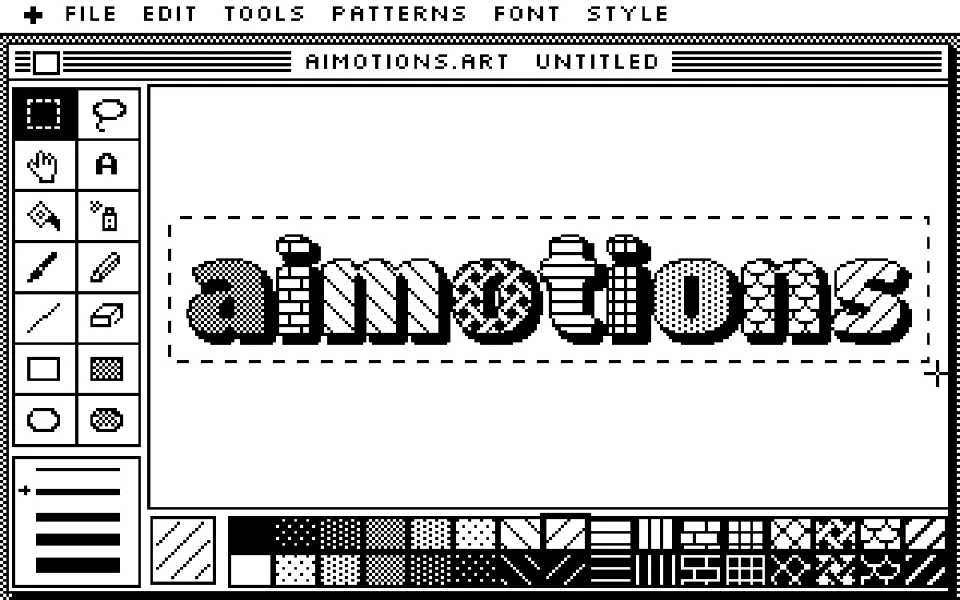
A 1-bit paint program text animation: the pencil traces the word, the bucket floods each letter with a dither pattern and a brush adds a bold shadow. Marching ants, a tool palette and pure black and white; for retro-tech and design-history themes.
Prompt · replace [TEXT]
Tool-agnosticRecreate an early-80s black-and-white paint program drawing [TEXT]. Strictly one-bit: pure black and white pixels, grays only as 8×8 dither patterns. A menu bar, a window with a horizontally striped title bar, a two-column tool palette of tiny pixel icons on the left (selection, lasso, hand, text, paint bucket, spray can, brush, pencil, line, eraser, shapes) with the active tool inverted, and a strip of fill patterns along the bottom. A pixel cursor picks the pencil and traces the outline of [TEXT] in rounded heavy letters, one pixel wide; then the paint bucket floods each letter instantly with a different pattern (checker, bricks, diagonals, weave, scales); the brush paints a solid offset drop shadow; finally a selection rectangle is dragged around the word and its dashed border crawls as marching ants. Clear the canvas and repeat.
Visual DNA
- Strict 1-bit black and white, no gray, only 8×8 dither patterns
- Tool palette with an inverted selected tool and a pattern palette
- Striped title bar, menu bar and a gray dithered desktop
- Pencil outline trace, instant bucket fills, brushed drop shadow
- Marching-ants selection rectangle crawling around the word
- Pixel arrow cursor that swaps to the active tool icon
- Category
- Retro Computing & Games
- Demo built with
- Canvas
- Energy
- Calm
- Background
- Light bg
Also known as
Support
Keep aimotions free
Buy me a coffee No paywall, no sign-up. If a prompt saved you an hour, a coffee keeps new styles coming.
Keys: ← → browse · C copy